
When you're ready to exit a position, you can close it directly from the chart or the Trades panel, or by placing an offsetting order. This article covers all three methods.
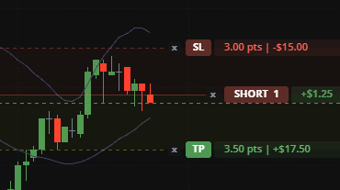
Closing from the Chart
- Locate your position's line on the chart.
- Click the X next to it.
- The position closes at the current market price.
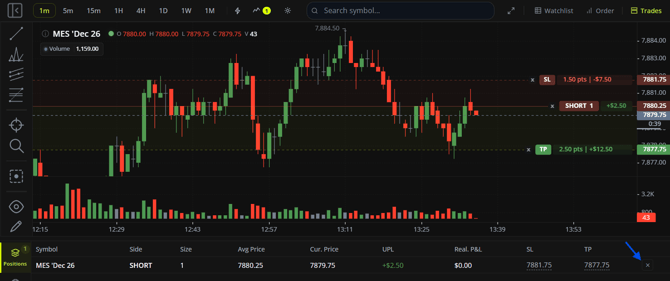
Closing from the Trades Panel
- Open the Positions tab in the Trades panel.
- Find the position you want to close.
- Click the X on that position's row.
- The position closes at the current market price.
Closing by Placing an Opposite Order
You can also close a position manually by placing an order for the opposite side, in the same quantity. For example, if you're long 2 contracts, placing a market order to sell 2 contracts of the same symbol closes your position.
This works with any of the order types covered in Placing a Market Order, Placing a Limit Order, and Placing a Stop Order.
Keep in Mind
- Placing an opposite order for a smaller quantity than your full position reduces your position size rather than closing it entirely.
This article is for informational purposes only and does not constitute trading advice. Futures trading involves substantial risk and is not suitable for every investor.