
A limit order lets you set the exact price you're willing to buy or sell at. Unlike a market order, it won't fill until the market reaches your specified price, or a better one.
Using the Order Panel
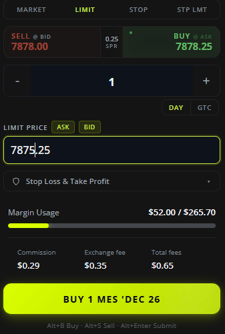
- Open the order panel on the right side of the screen.
- Click Limit at the top of the panel.
- Click Sell or Buy to choose which side of the market you want to trade.
- Set your quantity using the plus and minus buttons.
- Enter your limit price. You can type a price directly, or use the Ask or Bid buttons to quickly set the limit price to the current ask or bid.
- (Optional) Click the Stop Loss & Take Profit dropdown to attach a stop-loss and take-profit to the order.
- Click the Buy or Sell button at the bottom of the panel to submit the order.
Limit Price Rules
Because a limit order only fills at your specified price or better, the platform enforces a valid price range:
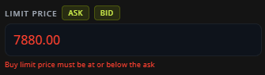
- A buy limit order must be placed at or below the current ask.
- A sell limit order must be placed at or above the current bid.
If your price falls outside this range, the platform shows an error and won't let you submit the order.
Placing a Limit Order from the Chart
You can also place a limit order directly from the chart.
- Right-click on the chart at the price level you want.
- A menu opens showing that price, a quantity selector, and two order buttons.
- The buttons shown depend on whether you clicked above or below the current market price:
- Below the current price: Buy Limit and Sell Stop.
- Above the current price: Sell Limit and Buy Stop.
- Click Buy Limit or Sell Limit to place the order at that price.
Keep in Mind
- A limit order isn't guaranteed to fill. If the market never reaches your price, the order stays open until it's filled, cancelled, or it expires based on your Day or GTC setting.
- Stop orders, also available from the chart menu, are covered in a separate article.
This article is for informational purposes only and does not constitute trading advice. Futures trading involves substantial risk and is not suitable for every investor.