
The MetroTrade platform lets you place trades directly from the chart, without opening the full order panel. This article covers two ways to do it: one-click trading and the right-click order menu. Placing orders using the order panel, including attaching stop-loss and take-profit, is covered in a separate article.
One-Click Trading
One-click trading places market orders instantly, without a confirmation step.

- Click the lightning bolt icon in the chart toolbar to open the one-click trading bar.
- The bar shows the current sell and buy price for the loaded symbol, along with a quantity selector.
- Click Sell or Buy to immediately place a market order at that price and quantity.
One-click trading only places market orders, and doesn't include the option to attach a stop-loss or take-profit.
Right-Click Order Menu
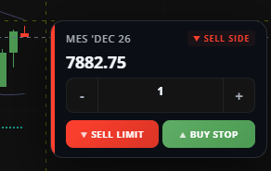
The right-click menu lets you place a limit or stop order at a specific price by clicking directly on the chart.
- Right-click on the chart at the price level you want.
- A menu opens showing that price, a quantity selector, and two order buttons.
- The buttons shown depend on whether you clicked above or below the current market price:
- Below the current price: Buy Limit and Sell Stop.
- Above the current price: Sell Limit and Buy Stop.
- Click the button that matches the order you want to place.
Like one-click trading, this menu doesn't include the option to attach a stop-loss or take-profit. If you need those, use the order panel instead.
Choosing a Method
- One-click trading is the fastest way to enter or exit a position at the current market price.
- The right-click menu is useful when you want to set a limit or stop order at a specific price level you can see on the chart.
- The order panel gives you full control over order type, duration, and attaching a stop-loss or take-profit. This is covered in a separate article.
This article is for informational purposes only and does not constitute trading advice. Futures trading involves substantial risk and is not suitable for every investor.