
Margin is the amount of money required in your account to open and hold a futures position. The MetroTrade platform shows your margin usage in a few places, so you always know how much of your account is committed to open trades.
Margin Usage in the Order Panel
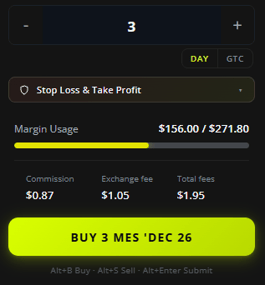
Before you place an order, the order panel shows an estimated margin usage for that trade.
As you set your order (symbol, quantity, and order type), the Margin Usage bar updates to show how much margin the order will use, displayed as your estimated used amount against your account total. This lets you check the margin impact of a trade before you submit it.
Margin Metrics in the Top Bar
You can also enable margin-related account metrics in the top bar. Available options include:
- Used Margin: How much margin you currently have tied up in open positions.
- Free Margin: How much margin you have available, calculated as your balance minus used margin.
- Intraday Margin: How much of your intraday margin allocation is currently in use.
- Overnight Initial Margin: How much of your overnight (initial) margin allocation is currently in use.
Enabling and customizing account metrics is covered in the Platform Overview article.
This article is for informational purposes only and does not constitute trading advice. Futures trading involves substantial risk and is not suitable for every investor.