
Opening Contract Details
- Click the i icon next to the contract symbol in the chart header.
- A panel expands showing the full contract details.
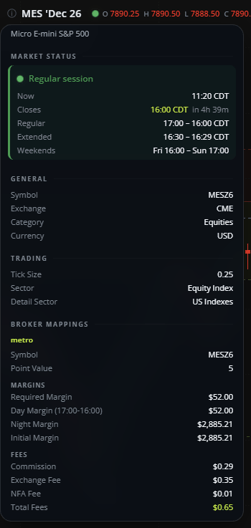
What's Included
Market Status
Shows real-time session information for the contract:
- Session status: The current session (for example, Regular session), marked with a status dot.
- Now: The current time.
- Closes: When the current session ends, with a countdown.
- Regular: Regular trading hours for the contract.
- Extended: Extended trading hours for the contract, when trading is not available.
- Weekends: When the market closes during the weekend.
General
- Symbol: The platform's ticker for the specific contract month.
- Exchange: The exchange the contract trades on.
- Category: The broader asset category.
- Currency: The currency the contract is priced in.
Trading
- Tick Size: The minimum price increment for the contract.
- Sector and Detail Sector: Classification info for the contract.
Margins
- Required Margin
- Day Margin, along with the hours it applies to
- Initial Margin
Figures shown are specific to the selected contract and update automatically.
Fees
- Commission
- Exchange Fee
- NFA Fee
- Total Fees
This article is for informational purposes only and does not constitute trading advice. Futures trading involves substantial risk and is not suitable for every investor.